Hello world of assembly
Assembly is the closest most programmers will ever get to hardware, since it is almost like machine language - just that the groups of bits are replaced with instructions. And while a hello world might be pretty simple in a high-level language like Python, Ruby, C++, C#, Java or something similar, it is not so simple in assembly, because even to write a basic hello world program we have to understand the computer architecture - how the components of a computer work together. Without that knowledge it is hard to understand assembly at all, so I will assume the reader has some knowledge of that, however I am leaving a video that describes the basics of how the CPU works. Also here is a guide on assembly programming that I found. It is also important to note that this code was developed and ran on a Linux system (Ubuntu 22.04.1 LTS x86_64) and might not work on other operating systems.
Prerequisites
First of all, if you want to compile 32-bit code on a 64-bit system, you will need to install a couple of libraries. You need nasm, gcc and libc6-dev-i386 for compiling 32-bit code. I have tried compiling both 64 and 32-bit code to compare the two of them. I will indicate for each program, whether it is 32-bt or 64-bit. I recommend you use the following commands to install the mentioned libraries.
sudo apt update
sudo apt upgrade
sudo apt install build-essential nasm libc6-dev-i386
To compile the 32-bit program use the following commands.
nasm -f elf32 yourFile.asm
gcc -m32 yourFile.o -o executableName
And to compile a 64-bit program use the following commands.
nasm -f elf64 yourFile.asm
gcc yourFile.o -o executableName
Printf (32-bit)
Anyways, to the program. There are a couple of ways of how we can make this work. One example of printing out hello world is using the C libraries - the printf function, which in assembly functions just like in C. Here is the code.
; 32-bit
bits 32
extern printf                           ; include the C's printf function
global main                             ; this makes the symbol main visible to the linker and thus all the other programs

section .data                           ; .data is a section where we save program data
        hello db "Hello world!", 10, 0  ; save hello world message with this

section .text
main:
        pushad                          ; push the registers on the stack
        push dword hello                ; push the message on the stack
        call printf                     ; call the printf function
        add esp, 4                      ; increase the stack pointer by 4 (bytes)
        popad                           ; pop the previous register values
        ret                             ; return from main and exit the program
And here is the output of the program.

Now, let us slowly dissect the program and each instruction. First of all the extern *instruction is used to “include” other (C) functions in our assembly program. It just tells the compiler that we are using it and then the linker find the appropriate library. After that we have the *global main instruction, which makes the symbol main visible to the linker, because the other object files will also use it - in this case we are using a printf C function. Then we have the section .data instruction, which tells the compiler that there will be a section where data is stored. When using section .text we tell the compiler that this section will contain code. Back to the data section, we have the hello db “Hello world!”, 10, 0 instruction, which is used for storing data. First we specify the date’s name then comes the command db that indicated we are storing data of type byte and then comes the data itself. First we add the message, and then following the comma we add a number 10 - number 10 in ascii being a new line. At the end there is a number zero - in ascii a NUL character which indicated the end of a string.
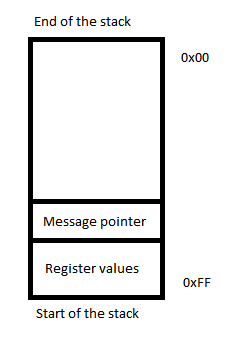
Then comes the main part of the code. The pushad instruction saves the values of registers. Why do we need to do this? We should always do this before calling another function, because that function might change the states of the registers that we are actively using, which might lead to unexpected, undefined behavior. However by pushing the registers on the stack and popping them back after the function has executed, we can avoid that. After that we push the pointer to hello message on the stack - this is needed for the printf function to work - it gets it’s data from there. The dword parameter in the push dword hello instruction represents the data type - numerical value of size 32 bytes (byte - 8 bytes, word - 16 bytes, dword 32 bytes, quadword - 64 bytes). After that we call the printf function with call printf. The function executes and prints out the Hello world! message. After that we clear the stack with add esp, 4 (4, because the size of a dword, which we pushed on the stack is 4 bytes). By the way, esp *is a register holding the stack pointer value - basically showing us a point on the stack. One important thing to note here is that the ASM stack does not start with zero, but with its last address of the stack. This means that adding new items to the stack will decrease the pointer’s value instead of increasing it and removing items from the stack vice-versa - we can clear the stack by adding values to the stack pointer (esp register) with the *add command - just be cautious not to go out of the stack. We can imagine the stack the following way - for this particular example I added the values that are added on the stack in the code (addresses used are just to represent the idea and do not correspond to actual values in the CPU stack).
After that we just pop back the register values to return to the original state and return out of the program. Seems pretty complicated? It kind of is when compared to high-level programming languages. And do not forget the fact that we used a pre-written C function for printing out the message! In the next example I will write the same program but without using the C functions.
No printf (64-bit)
This program will not use the print function and will use system calls to print out the message. We can look at the available system calls on this website. Since we are writing to the standard output (“the console window”), we need to look at the write system call. The website also suggests that in order to call the write system call we need to save the value 1 inside of the rax register - one of the registers for saving data. Here is a list of all registers available on most x64 platforms.
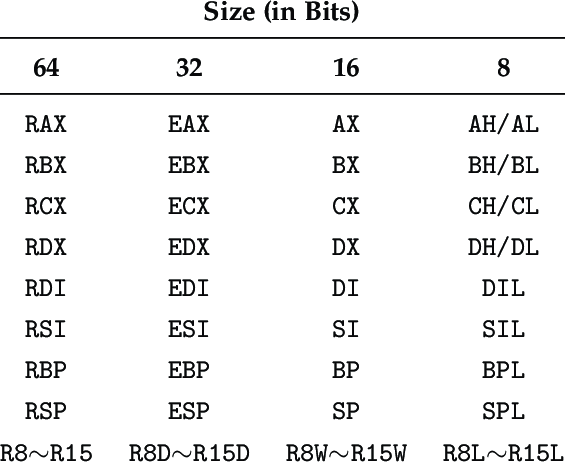
Anyways, saving the value of 1 ensures that upon a system call the write function is called - which writes values to a provided stream (in our case the stream will be the standard output).

Here is the code.
; 64
global main                               ; this makes the symbol main visible to the linker and thus all the other programs

section .data                             ; data section
        hello: db  "Hello world!", 0X0A   ; this is how we save data, but the syntax is a little bit
                                          ; different, also the value 10 is written as a hex value
        len:   equ $-hello                ; len saves the length of the message - equ $-message is
                                          ; is a pseudo-instruction that returns the message length

section .text                             ; code section
main:                                     ; main function
        mov rax, 1                        ; sys_write - the function that we are calling
        mov rdi, 1                        ; stdout (standard output) - the descriptor,
                                          ; which we are writing to
        mov rsi, hello                    ; we save the message address here
        mov rdx, len                      ; we save the length of the message here
        syscall                           ; the systemcall uses the values saved in registers

        mov rax, 60                       ; sys_exit - exit function that we are calling
        mov rdi, 0                        ; here we save the program exit code
        syscall                           ; yet again a system call
So lets go over the code again. First again we have the global main instruction which server the same purpose as before. The same goes for saving the Hello world! message, except the syntax is a little different. However there is something new here - the len: equ $-message pseudo-instruction which obtains the message length and saves it under the len label. Then we have the code section with the main function. Here is where the differences really begin. Firstly, there are a bunch of registers used in the code - such is the way how a lot of instructions work. We first save the data that will be used by the instructions inside of the registers and then call the instructions. Some instructions - including the here used syscall - call one of the functions in accordance with the provided value in the register. For example, here we save the value of 1 inside of the rax register using the mov rax, 1 instruction (1 represents the descriptor for standard output [0 is standard input and 2 is standard error output]). This tells the syscall *instruction to call the *sys_write function, which then gets more data from other registers and writes some data to the provided descriptor (stream). So for sys_write to work, we need to give the function some parameters - we do this by saving the parameters inside of specific registers. Parameters usually go inside of the following registers in order: rdi, rsi, rdx - but this should be checked for each independent function. The other parameters we provide are the message’s address with mov rsi, hello and the length of the message with mov rdx, len. *Then we do a system call with *syscall and the write function is executes. Return value of the function can be found in the rax register - for example if the write function fails, we get a different exit code. After that we save the value of 60 inside of the rax *register, which corresponds to the *sys_exit function, as well as save the program exit code inside of the *rdi *register (value of 0, which means success). After that we do another system call and the program exits.
Conslusion
In conclusion, assembly can be pretty complicated and the learning curve can be pretty rough, since understanding the language requires a decent knowledge of computer architectures. Even a hello world program can be pretty complicated, however on the other hand the code is really fast and allows us to directly access the hardware. A good example of its usage is the previous post I made, where I obtained the CPU information using inline assembly inside of C++.